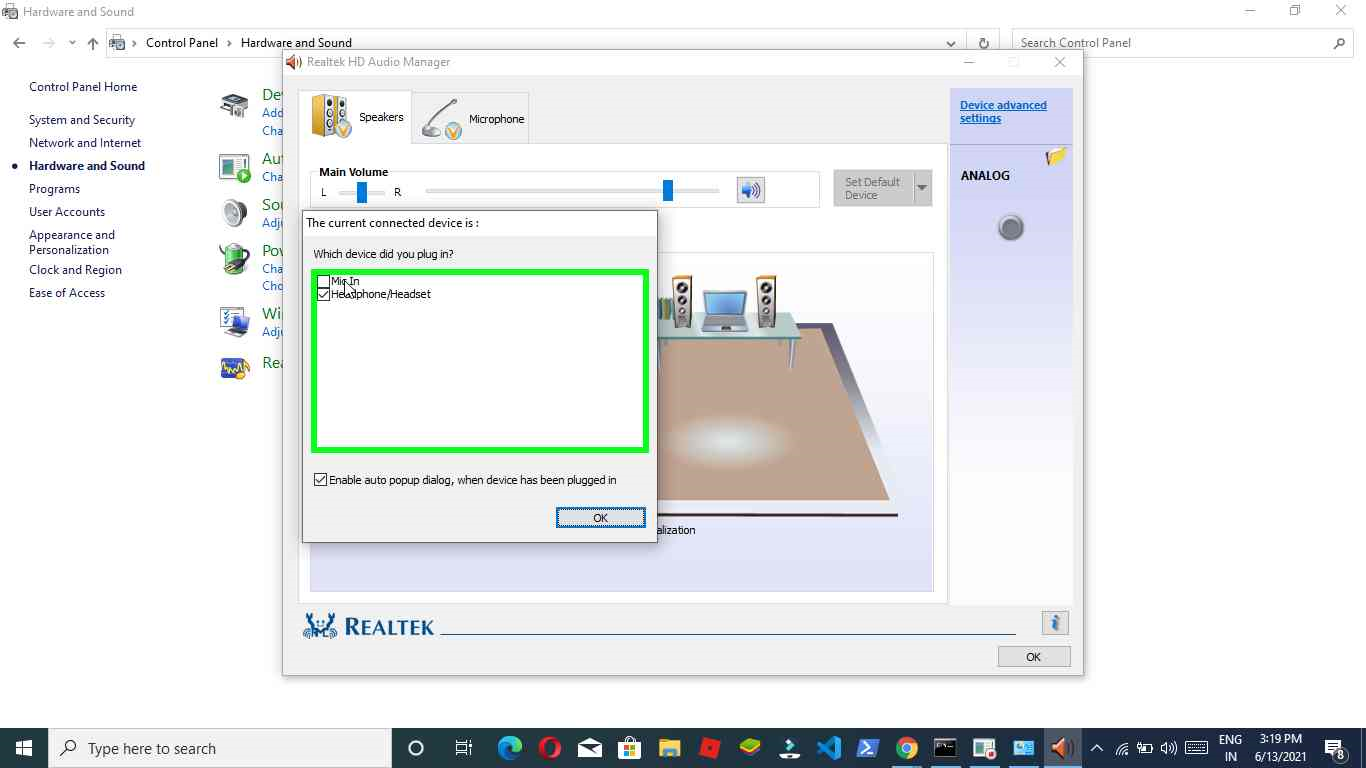
8 simple steps to restore 2 ringed jack of mic not working in laptop | Solution mic not working in windows 10 || realtek hd audio manager || should readout


The approach of remote earphones is gradually letting the earphone jack go, yet it's not going out without a battle. The plan, which follows its underlying foundations back to the last part of the 1800s makes certain to track down a home on wired earphones, workstations, and different pieces of sound gear for quite a long time to come. 
In the event that you've at any point pondered the attachment on your old arrangement of wired EarPods or different earphones for even a second as you go to pop it into a jack, you've definitely seen the series of little, shaded, plastic rings it has in fluctuating numbers from one fitting to another. What are those for?
The work of an earphone attachment and jack really is basic: to convey sound signs from the source and send them to your earphone's the place where they're played as sound. These rings assume a significant part, not due to what they do, but since of what they don't.
follow the steps to get your mic work-

step1:>  restart your pc.

step2:>  left click on "Type here to search (button)"


step3:> "Search" [control panel], and left click on "Control Panel, App


step4:> left click on "Hardware and Sound


step5:>left click on "Realtek HD Audio Manager


step6:>left double click on "Headphone/Headset (image)" in "Realtek HD Audio                 Manager"


step7:>left click on "Mic In (check box)" in "The current connected device is :"


step8:>left click on "OK (button)" in "The current connected device is :"


step9:>left click on "OK (button)" in "Realtek HD Audio Manager"


A two-ring connector is comprised of three primary parts: the tip, the sleeve, and the lodging. The metal "tip" part of the connector conveys the primary sound of electric heartbeats from the sound-creating gadget, through the connector to the yield. The metal "sleeve" parcel goes about as an electric ground to stay away from short circuits in electronic gadgets. 

The three-ring connector contains four principal parts: the tip, the ring, the sleeve, and the lodging. Like the two-ring connector, the sleeve partition goes about as a ground to stay away from electric shortcircuits. In any case, different pieces of the connector act in an unexpected way. Sound system sound depends on both a left and a right sound channel to make a division. The tip partition goes about as the left channel, while the ring segment goes about as the right channel

now I hope the problem will solve now for similar content visit my youtube channel - https://www.youtube.com/channel/UC0P6CdAI2zU14j4BFly-AAQ
and subscribe to my channel, please read my blogs regularly

Comments

Post a Comment

Share your views on this blog😍😍

Popular posts from this blog

How do I run Python on Google Colab using android phone?

Regardless of whether you are an understudy keen on investigating Machine Learning yet battling to direct reproductions on huge datasets, or a specialist playing with ML frantic for extra computational force, Google Colab is the ideal answer for you. Google Colab or "the Colaboratory" is a free cloud administration facilitated by Google to support Machine Learning and Artificial Intelligence research, where frequently the obstruction to learning and achievement is the necessity of gigantic computational force. Table of content- What is google colab? how to use python in google colab? Program to add two strings given by the user. save the file in google colab? What is google colab? You will rapidly learn and utilize Google Colab on the off chance that you know and have utilized Jupyter notebook previously. Colab is fundamentally a free Jupyter notebook climate running completely in the cloud. In particular, Colab doesn't need an arrangement, in addition to the notebook tha...

Introducing CodeMad: Your Ultimate Universal IDE with Custom Shortcuts

Introducing CodeMad: Your Ultimate Multi-Language IDE with Custom Shortcuts Welcome to the world of CodeMad, your all-in-one Integrated Development Environment (IDE) that simplifies coding and boosts productivity. Developed in Python, CodeMad is designed to make your coding experience smoother and more efficient across a variety of programming languages, including C, C++, Java, Python, and HTML. Whether you're a beginner or an experienced programmer, CodeMad is your go-to tool. In this blog, we'll dive deep into the workings of CodeMad, highlighting its unique features and easy installation process. The Power of Shortcuts CodeMad's intuitive interface is built around a set of powerful keyboard shortcuts that make coding a breeze. Here are some of the key shortcuts you'll find in CodeMad: Copy (Ctrl+C) : Duplicate text with ease. Paste (Ctrl+V) : Quickly insert copied content into your code. Undo (Ctrl+Z) and Redo (Ctrl+Y) : Correct mistakes and s...

Run Python script in Android app

hello friends, I am Rohit Singh at Road2Geeks today in this blog I will discuss different apps to use Python on your Android phone? as we all know friends there are different ways to use python on an Android phone these could be only offline or online but I have some interesting ideas to use python on your android phone some of these are interesting apps and in this blog, I will show you different apps in which you can access python on your android phone so lets us get started in today's blog titled Run Python script in Android app. RUN PYTHON SCRIPT ON ANDROID Python has validated itself as a significantly skilled language — amicable for amateurs, yet extraordinary in the ownership of trained professionals. Is there any substantial motivation behind why you shouldn't have the alternative to use Python any place that you need to encourage a PC to achieve something? Likewise, shouldn't your mechanical assemblies misuse all of the capacities of Python as a language, not just ...